

The latest Genesis Foods releases in Q1 2026 introduced new capabilities that help teams work more efficiently across ingredient management, formulation, and labeling. Highlights include in-workflow guidance, faster ingredient setup from spec sheets, clearer tracking for voluntary disclosures, and expanded label format options within Genesis Foods’ existing set of compliant label choices.
Faster answers with less manual entry
Many Genesis Foods users spend their day moving between formulation, labeling, product data, and regulatory questions. Even simple tasks can slow down when users have to leave their workflow to look something up, search for instructions, or manually enter information from supplier documents. This release helps reduce that friction.
Two of the most important updates in Q1 2026 are Trustwell Advisor and the Ingredient Spec Sheet Scanner. Together, they help users spend less time searching, typing, and switching between systems.
Trustwell Advisor brings helpful guidance into the workflow
 Trustwell Advisor gives users a new way to get answers while they work in Genesis Foods. Instead of stopping to search through outside resources or internal notes, users can highlight text and ask questions in the moment. That could mean getting help with a nutrition term, understanding a label claim, reviewing a regulatory topic, or learning how to complete a task in Genesis Foods.
Trustwell Advisor saves your time and attention for what matters most.
By bringing helpful guidance into the workflow, Trustwell Advisor helps teams keep moving without losing their place. New users can get up to speed more quickly. Experienced users can resolve questions without breaking stride. And teams can spend less time hunting for answers and more time reviewing their work and making informed decisions.
This update also supports a more confident review process. Users get a useful starting point and can continue applying their own knowledge and judgment before moving forward.
Ingredient Spec Sheet Scanner helps teams cut down on repetitive entry
Ingredient setup can take time, especially when users are working from supplier spec sheets and entering the same types of details again and again.
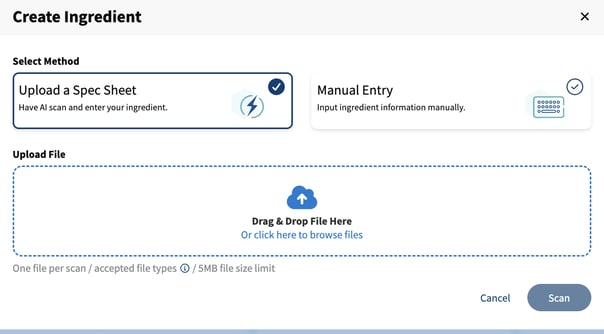 The Ingredient Spec Sheet Scanner helps reduce that burden by pulling data from ingredient spec sheets directly into Genesis Foods. Instead of building every record by hand, users can start with key fields already populated and then review, edit, and complete the information as needed. That means less manual entry and a more efficient starting point.
For teams managing large ingredient libraries or bringing in new supplier data on a regular basis, this can help speed up a task that often takes significant time. It also helps create a cleaner workflow by keeping the source document attached for future reference.
Just as important, final approval of the ingredient still stays with the user, maintaining that essential human review step. Teams can confirm critical details, make updates, and complete the final record with confidence.
Automate tracking voluntary product details
Food and beverage teams often need to track product details that go beyond standard data fields. That may include voluntary disclosures like Non-GMO or other attributes important to the business.
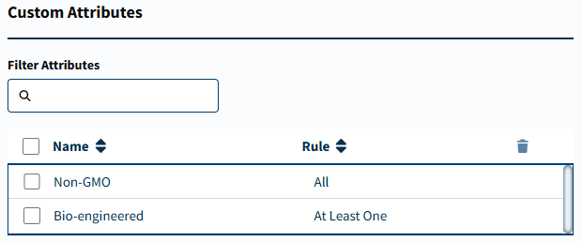 With Custom Attributes, Genesis Foods gives users more flexibility to track those details across the program.
This update makes it easier to manage the information that matters to your brand, your customers, and your internal teams. Instead of relying on side notes or separate processes, users can add custom attributes directly in Genesis Foods and carry them across ingredients, recipes, packaging assets, and reports.
That creates a more connected process and better visibility. When teams have a clear way to track voluntary disclosures and other product characteristics in one place, it becomes easier to stay aligned and keep important details from slipping through the cracks.
Workflow improvements that help labeling teams move faster
The Q1 2026 release also includes a workflow update in the Label search that helps users search more efficiently.
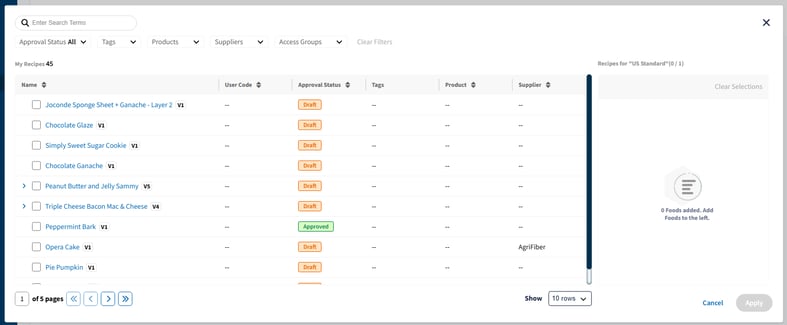
Formulation and labeling teams often repeat the same steps across many products and projects. Genesis Foods now includes an improved search modal in the Label selector that allows users to filter recipes by multiple criteria. Users can also add multiple items at the same time. When search is easier and selections take fewer clicks, users can move through tasks more quickly and spend more time on review and decision-making.
Expanded label format options for specific packaging needs
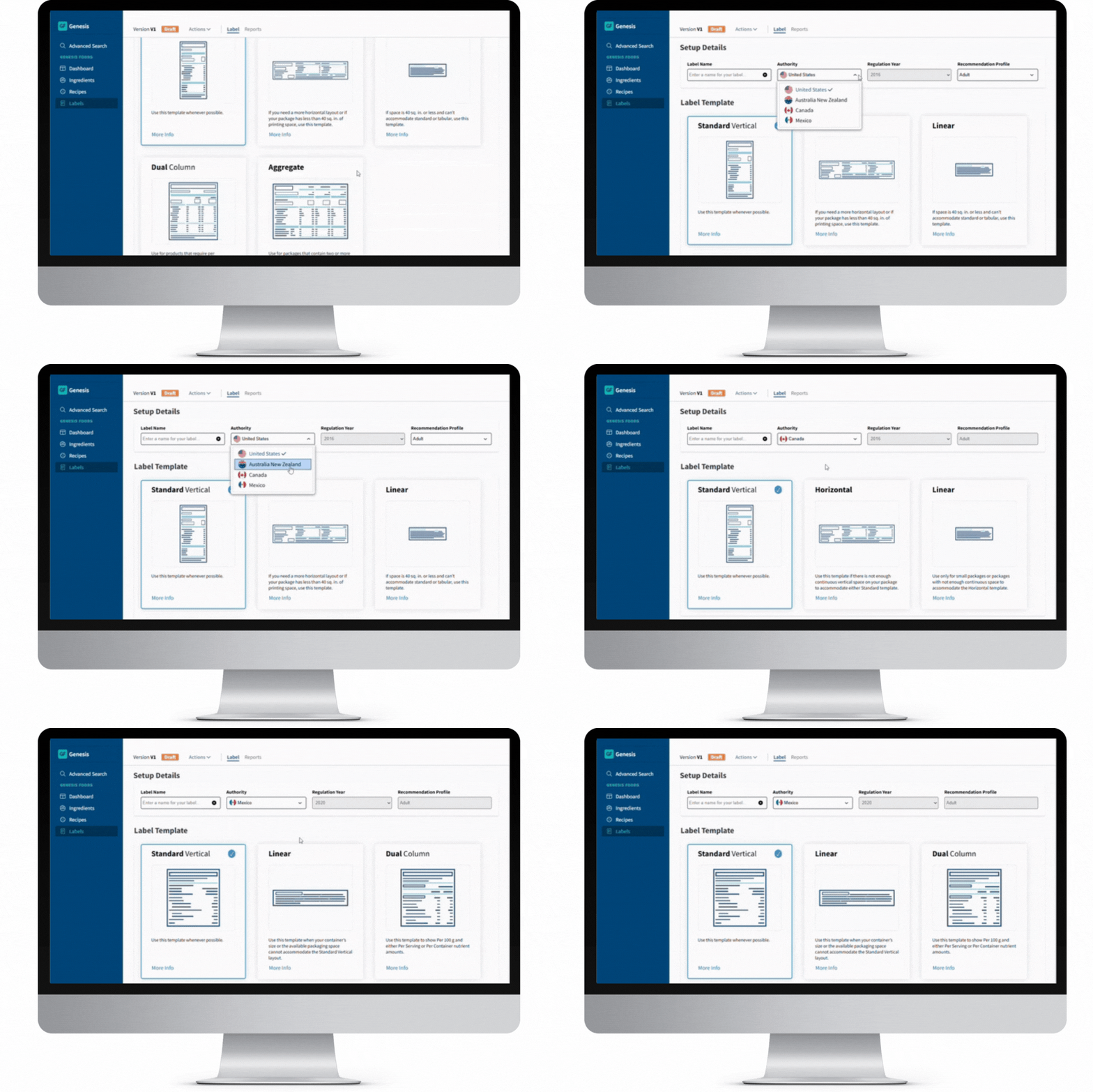
Genesis Foods already offers users a strong set of compliant label formats. In Q1 2026, that set expands with the addition of the U.S. Dual Column Tabular label format. This new option gives teams another way to present dual-column nutrition information for products that need that format.
The value here is flexibility. Different products and packaging layouts call for different label solutions, and this update gives users one more option within Genesis Foods’ broader set of labeling formats.
What these Q1 2026 updates mean for Genesis Foods users
Taken together, the Q1 2026 Genesis Foods updates are all about helping users work more efficiently while keeping control where it belongs: with the people doing the work.
Trustwell Advisor helps users get helpful guidance without leaving Genesis Foods. The Ingredient Spec Sheet Scanner reduces repetitive entry and gives teams a faster starting point for ingredient setup. Custom Attributes make it easier to track voluntary disclosures and product characteristics across the program. Workflow improvements support faster formulation tasks. And the new U.S. Dual Column Tabular label adds one more option to an already robust set of compliant label formats.
The result is a release built around practical value:
less time spent searching for answers
less manual data entry
better visibility into product details
smoother formulation and labeling workflows
more flexibility for packaging and label needs
That is what stands out most in this release. Genesis Foods continues to add capabilities that help teams move faster, review with confidence, and manage complex product work more effectively.
Stay Informed
To learn more about these new features, explore our Release Notes or contact us at release@trustwell.com for further details. Stay connected with us on social media for the latest insights from industry leaders.
Tag(s):
Trustwell News
Other posts you might be interested in
View All Posts
Product Formulation
26 min read
| January 12, 2026
The Best of Genesis Foods in 2025: 6 Feature Updates That Delivered Real Impact
Read More.jpeg?length=360&name=AdobeStock_278955183%20(1).jpeg)
Trustwell News
7 min read
| December 9, 2025
What’s New in Genesis Foods: Supporting Real-World Menu Labeling and R&D
Read More
Trustwell News
8 min read
| January 1, 1970